
Matching a specific date/time to the same date in a time range
Forums
I have a spreadsheet which shows dates of service and the start and end time of that service. It also shows the date and time that service was signed. I'm trying to get IDEA to match the specific signed date/time to the date of service if the time fall withing the start and end time. I've included two spreadsheets below. One show how it looks right now (2.5.2026 Example) and the other (Results) are what I'm hoping I can get it to look like in the end. I color coded the times that matched.
My original plan was to make a duplicate spreadsheet of 2.5.2026 Example and do a join function matching on the date of service and the signed date. In the Join window I wrote a script using @BetweenTime( COL_SIGNED_TIME , COL_START_TIME_MIL , END_TIME_MIL ), but the result only produced the first row because the signed time fell in between the Start/End time, even though the dates did not match.
Hi Brian, I went through…
Hi Brian,
I went through your steps, but did a few things a little different. I created a duplicate of the example spreadsheet but labeled it as "ST 2.5.2026" and added "ST" to all of the columns. I did this because I need to be able to show the Date of Service of matching signed date/time in the results.
I also got ride of the Start and End Time Columns, but left the ones with "MIL" to make things a little simpler.
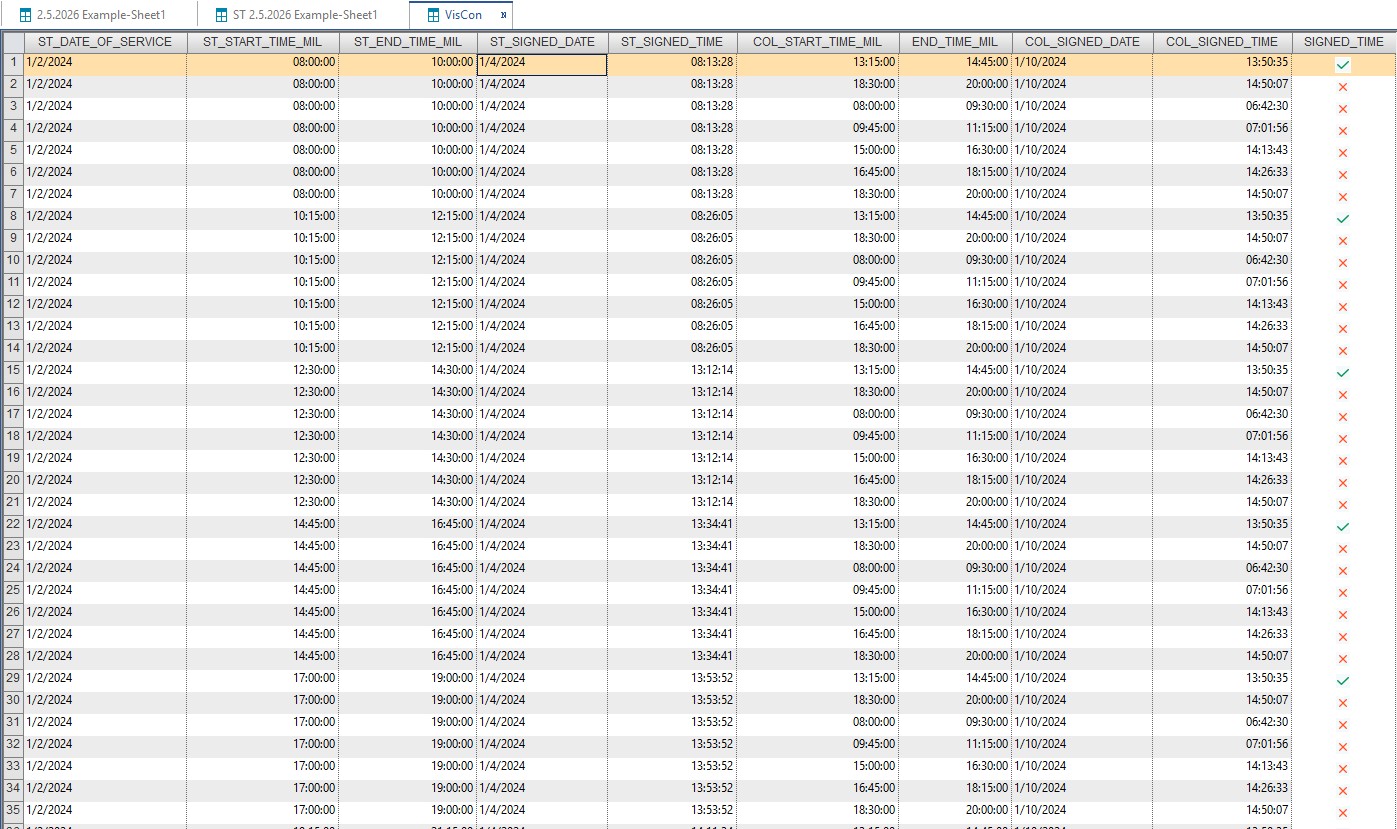
I'm not getting the results that you had. I did go back and do it exactly like you did and the results seem accurate, but I really need to show both dates of service. I noticed that when using the visual connector it gets ride of the secondary file's matching column (Date of Service). Is that normal? Please see the attached image.
Hi CFE4130,This is how I did…
Hi CFE4130,
This is how I did it. I took your example file, imported it into IDEA. I then did a direction extraction selecting all the items but only selecting the DATE_OF_SERVICE, START_TIME, START_TIME_MIL, END_TIME and END_TIME_MIL fields.
I then did the same direction extraction but selected the SIGNED_DATE and SIGNED_TIME fields.
This gives me two file, one containing the start and end time of the service and a second file with the signed date and time fields.
I then used visual connector to join the two files together. The primary file was the one with the signing date fields. I used SIGNED_DATE and DATE_OF_SERVICE as the key fields between the two files. When you select OK you then have the Save File As option, select All records in the primary database, all matches. This will give you a file of all the records matched by date.
On the joined file I created a Boolean field which I called SIGNED_TIME with the following formula: @if(@BetweenTime( COL_SIGNED_TIME , COL_START_TIME_MIL , END_TIME_MIL ), 1, 0), I took your equation and just placed it in an if so if there is a match it returns a one, if not it returns a zero.
Then do an extraction on SIGNED_TIME == 1 and I obtain the same transactions as in your result file.
Let me know if anything doesn't make any sense.
Brian